Custom Actions · Platform API · Ticket sidebar
Call your platform API without leaving the ticket.
Password resets, credit top-ups, account fixes — wire any endpoint once, then let agents run it from the sidebar with customer data already filled in.
Paid plans · Starter 2 · Advance 6 · Pro 20
The workflow
From “reset my credits” to done — in one tab.
Before, you'd open admin tools, find the user, run a script, then come back to reply. Custom Actions collapse that into a confirm click inside the ticket.
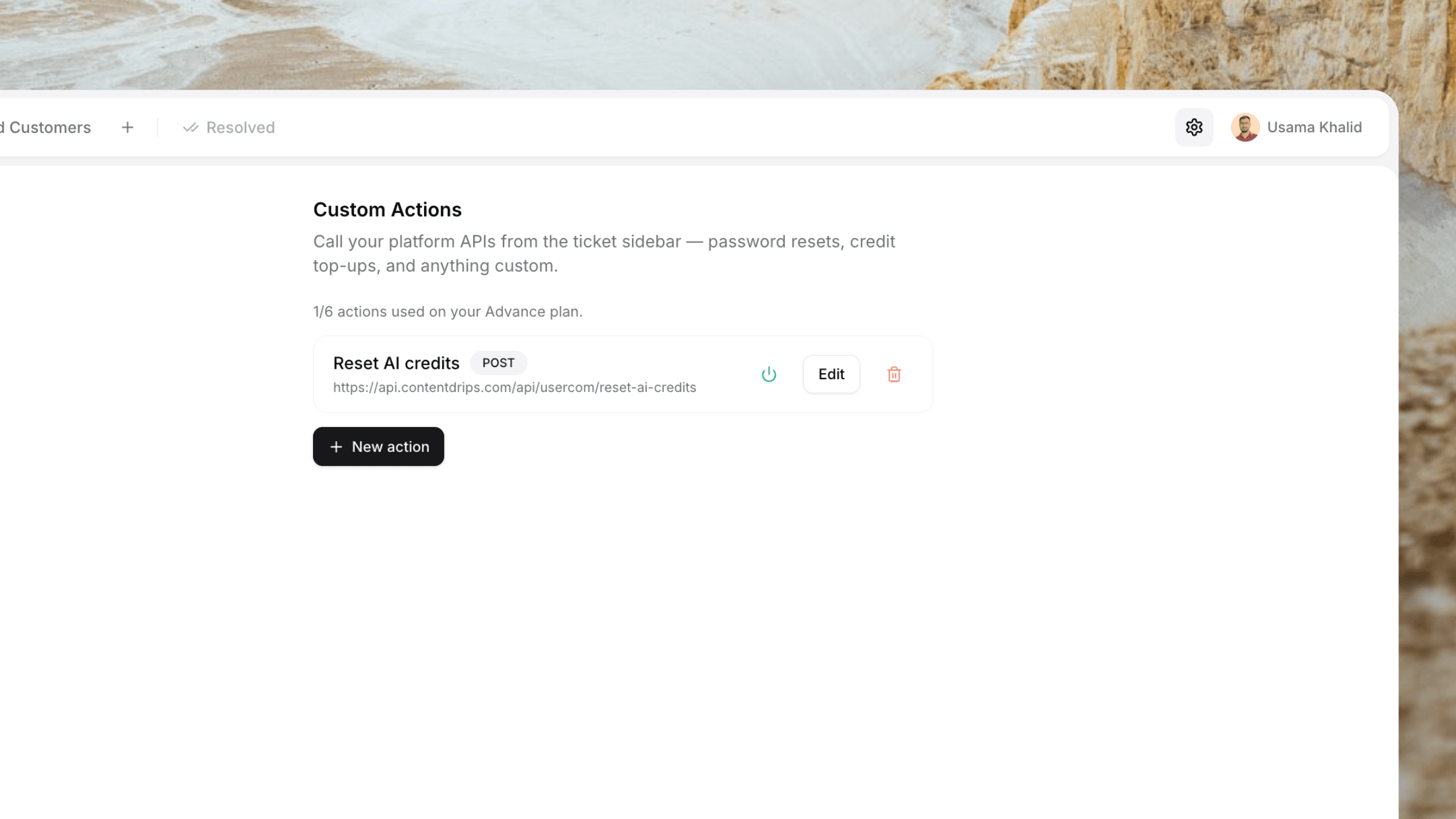
Configure once in Settings
Add an action: URL, method, auth, JSON body with {{placeholders}}, and map parameters to ticket fields or customer attributes.
Customer opens a ticket
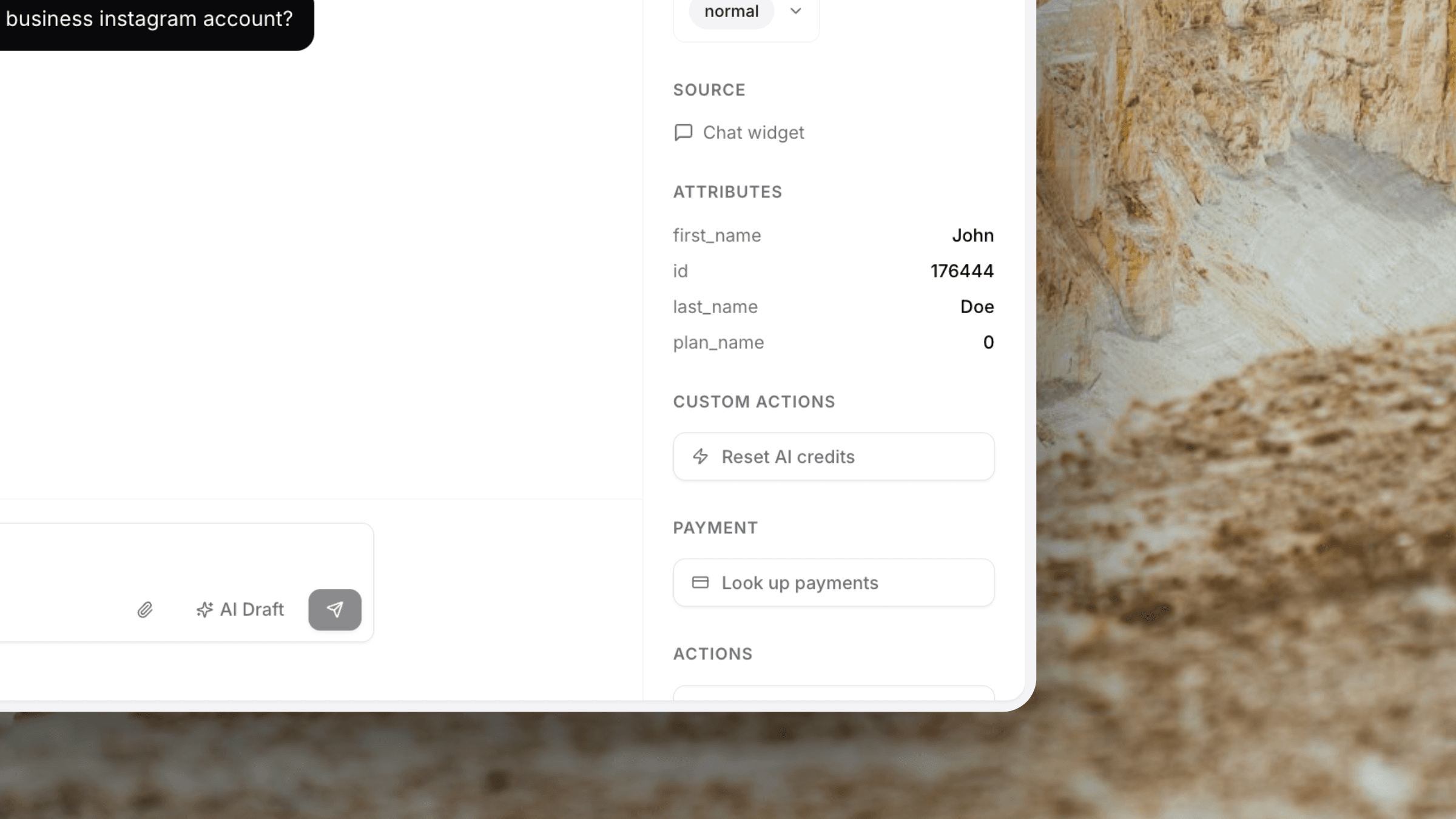
Their email, name, and Identify attributes are already on the ticket. Your action buttons appear in the sidebar.
Agent runs it from the sidebar
Review prefilled params, fill anything missing, confirm, and Userscom calls your API. Success or failure is logged on the ticket.
Capabilities
Your APIs. Your support workflow.
Any custom endpoint
POST password resets, credit top-ups, unlocks, CRM syncs — whatever your platform already exposes.
Flexible auth
None, Bearer token, or API key with a custom header. Secrets stay on the server and are masked in Settings.
Attribute-aware params
Pull user_id, plan, and other Identify traits automatically. Fall back to agent input when a value is missing.
Confirm before running
Agents review the payload in a modal — same calm UX as Stripe/Paddle actions — then confirm.
Admin-only setup
Only owners and admins create or edit actions. Every agent on the workspace can run enabled ones.
Audit on the ticket
Each run appends a system message so the team can see what ran and whether it succeeded.
Use cases
Built for the tickets you already get every week.
Common actions
- Send a password-reset email via your auth API
- Reset AI credits or usage quotas
- Unlock a suspended account
- Grant a trial extension or promo code
- Flag a user in your admin / CRM
- Trigger an internal ops webhook
Plan limits
- Free — not included (upgrade to unlock)
- Starter ($20/mo) — 2 custom actions
- Advance ($40/mo) — 6 custom actions
- Pro ($75/mo) — 20 custom actions
- Configure in Settings → Custom Actions
- Run from any ticket sidebar once enabled
Plus everything else
Custom Actions sit inside a complete support stack.
Live Chat Widget
~30 KB widget. One script tag. Loads instantly on any site.
AI Ticket Sorting
Tickets auto-route to the right tab before you open them.
Stripe & Paddle
Refund and cancel subscriptions right from the ticket.
Customer Context
Identify attributes power Custom Action parameters.
AI Draft Replies
AI drafts a reply. Edit if needed, send in one click.
2-Minute Setup
Add an action in Settings and it appears on every ticket.
Frequently asked questions
Custom Actions are HTTP calls you configure once — method, URL, auth, and a JSON body with placeholders. Agents trigger them from the ticket sidebar, with parameters filled from the customer’s email, name, attributes, or a quick prompt.
Anything your platform API can do: password reset emails, resetting AI credits, unlocking accounts, issuing promo codes, syncing CRM status, or kicking off an internal workflow. If it’s an HTTPS (or HTTP for local testing) endpoint, you can wire it up.
When you create an action, you declare parameters and where they come from — ticket email, ticket name, ticket ID, a customer attribute from Identify, or a field the agent fills in. Missing attributes show as editable inputs so agents can still run the action.
Each action supports None, Bearer Token, or API Key (with a configurable header name). Secrets are stored per organisation, masked in the dashboard, and only admins/owners can create or edit actions.
Custom Actions are available on paid plans: Starter includes 2 actions, Advance includes 6, and Pro includes 20. They are not available on the free plan.
No. Only authenticated agents in your Userscom dashboard can run them from the ticket sidebar. Each run is logged as a system message on the ticket for an audit trail.
Ship your first Custom Action in minutes.
Connect an endpoint, map a couple of parameters, and let agents resolve platform tasks without leaving Userscom.
Custom Actions on Starter, Advance & Pro · Free plan forever for the rest